How to Get Your Teachers Using New Coaching Software in One Week
New software fails when teachers do not use it. Follow this simple seven-day plan to get your whole faculty comfortable with attendance, marks and notes.
Buying or starting new software is the easy part. Getting every teacher to use it every day is the real challenge. Many centres try a tool for two weeks, see that half the teachers have gone back to the register, and decide that software does not work.
The problem is rarely the software. It is the way the change is introduced. Here is a simple seven-day plan used by many small institutes.
Before you start
Pick a start date, preferably at the beginning of a month. Tell teachers why you are doing this: less paperwork, fewer parent calls, and faster results. People adopt change when they see what is in it for them.
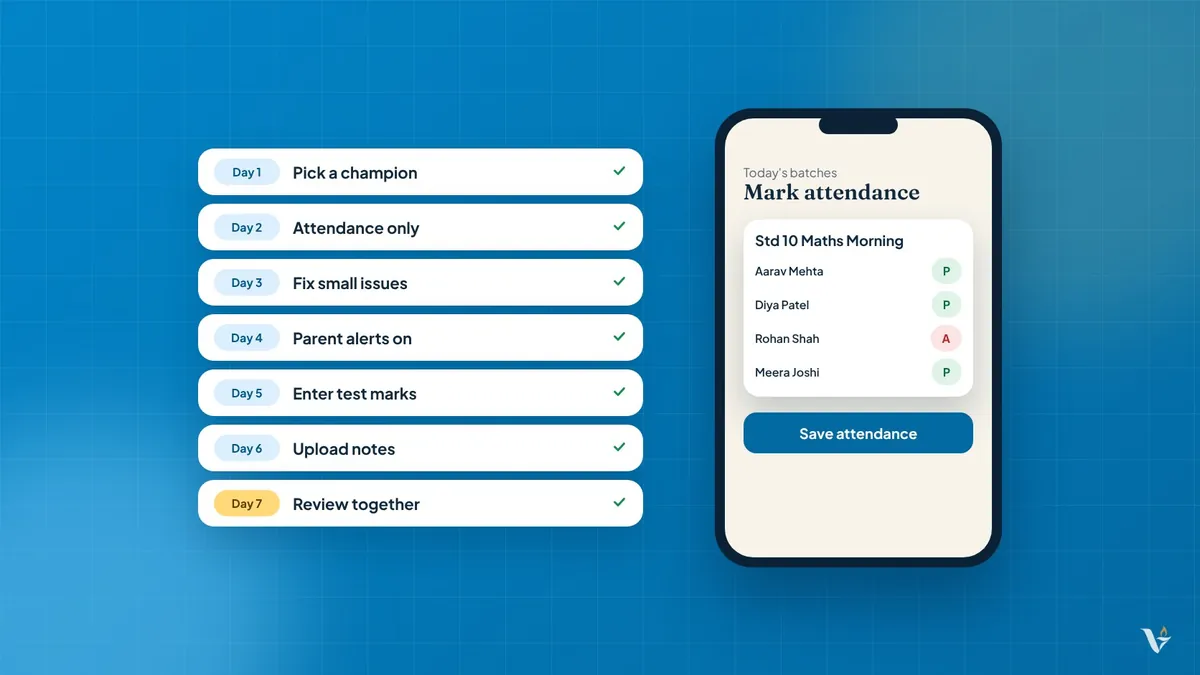
Day 1: One champion
Choose the most comfortable teacher or an office assistant as your champion. Spend an hour with them on the main screens: attendance, marks and notes. They will become the first person others ask for help.
Day 2: Attendance only
Ask every teacher to mark attendance on their phone for one batch. Nothing else. A 1-tap attendance screen takes seconds, so this is an easy first win.
Day 3: Fix small problems
Ask each teacher what felt confusing. Common issues are login problems, wrong batch lists and slow internet. Solve these quickly so frustration does not build.
Day 4: Add parent alerts
Turn on message alerts to parents for absent students. Teachers quickly notice a benefit: fewer phone calls asking "Was my child present today?"
Day 5: Enter test marks
Have teachers enter the latest test marks in the system. They will see ranks generated automatically instead of calculating them by hand.
Day 6: Upload notes
Each teacher uploads one chapter's notes to the notes hub. Students notice this immediately and start asking for more.
Day 7: Review together
Hold a ten-minute meeting. What worked? What is still confusing? Who needs more help? Celebrate the teachers who adopted it quickly.
Habits that make it stick
- The owner checks the dashboard daily and mentions it in conversation.
- Stop accepting paper attendance after the first week.
- Make one person responsible for support in the first month.
- Keep instructions short and in simple Gujarati or English.
Common mistakes
- Starting with too many features at once
- Not explaining the benefit to teachers
- Allowing both the register and software for months
- Ignoring teachers who are less comfortable with phones
How Vidhyantu helps
Vidhyantu is a web app that works on any smartphone or computer, so there is nothing heavy to install. Our team offers free onboarding and helps your centre set up students, staff and batches so your teachers can start with attendance on day one.
Want this for your centre? Talk to us on WhatsApp or fill the form at vidhyantu.com. Vidhyantu costs ₹6,000 per year for unlimited students.